
aVenture has one account for everything: the website, the iPhone, iPad, and Mac apps, the command-line tool, the API, and the connector that lets AI assistants such as Claude and ChatGPT read aVenture. The same plan covers every one of them.
What's Free and What's Metered: aVenture Plans Explained
What each aVenture plan costs, what it includes, and what happens when you reach a limit.
6 min read
Three plans, plus custom
| Free | AI Plus | AI Pro | |
|---|---|---|---|
| Price | $0 | $49/month, or $490/year | $199/month, or $1,999/year |
| Company profile views each month | 15 combined with people | 500 | 5,000 |
| People profile views each month | Same shared 15-profile pool | 500 | 5,000 |
| Company brand lookups each month | 250 | 5,000 | 50,000 |
| Web searches each month | 25 | 200 | 1,000 |
| Company research requests each month | None | 30 | 270 |
| Person research requests each month | None | 30 | 270 |
| AI credits per billing period | None | 100 | 500 |
| Plain-English search and name lookup in the API, CLI, and MCP | 5 searches and 20 lookups a day | No daily cap | No daily cap |
New AI Pro subscribers can pay $588 for their first year on the annual plan, then $1,999 a year after that. If your team needs custom reports, a CRM integration, or a dedicated analyst, ask about Expert, which is priced per engagement.

Start free with just an email
The Free plan needs only an email address and a one-time code, and no card is required to start. It includes one shared pool of 15 company and person profiles per calendar month, not 15 of each. The Free plan also includes funding history and contact data, and it works on the website, in the apps, and through the command-line tool and the AI-assistant connector.
On the website, AI search is open to everyone, signed in or not. Through the API, the command-line tool, and the connector for AI assistants, the Free plan has a daily limit on plain-English searches, such as "seed-stage climate software companies in Austin", and on company or person name lookups. AI Plus and AI Pro have no daily limit on these.
A name that exactly matches the name in a profile's web address or its username still finds that profile on every plan. You can also go straight to a company by its website, say stripe.com, and that works on every plan, even past the daily limit.
What counts against an allowance
Opening a company or person profile counts once for that calendar month, so opening the same profile again that month costs nothing. A brand lookup counts once per company each month, separately from profile views; Company brand lookup returns a company's names, logos, links, and tags. Each web search counts on its own. Each company or person you send for research counts once; Research updates explains what a research run does. AI credits pay for each message you send to the research agent. Plain-English searches have no monthly limit; if you send a burst of them, searches from your account briefly slow down.
Profile views, brand lookups, research requests, and web searches all start over at the beginning of each calendar month (UTC). AI credits reset on Researchly's billing period. Your settings page shows each of these as a meter.
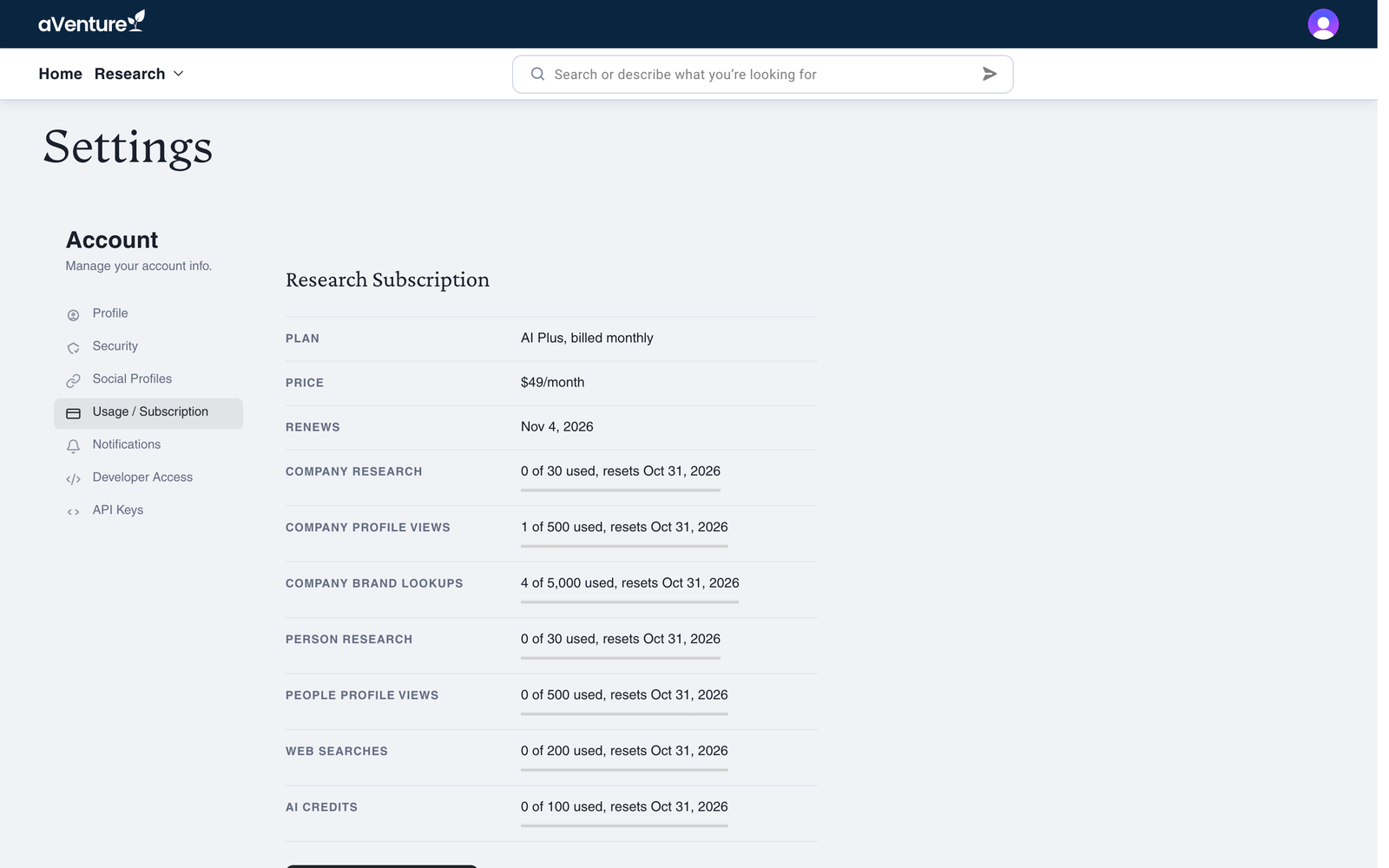
When you reach a limit
When you reach a limit, the request stops. The message names the limit you hit and how to raise it.
On AI Plus and AI Pro, you can turn on additional usage in your subscription settings so requests continue past the limit at these prices:
| Usage | Price past the allowance |
|---|---|
| Company research request | $2.50 |
| Person research request | $0.65 |
| Company or person profile view | $0.025 |
| Web search | $0.025 |
| Company brand lookup | $0.001 |
| AI credit | $0.35 |
If you are signed in on the aVenture website, you can buy prepaid credit with or without a subscription, in any amount you choose. Usage past your included allowance draws from that credit at the prices in the table above and stops when the credit runs out. Buying credit adds no subscription features: without a plan you keep the Free plan's allowance and features, and link search and page reads stay with paid plans. You can set an optional monthly usage limit; an AI assistant can add credit for you only after you turn that on in your web settings, and each purchase still needs your own approval.
On AI Plus or AI Pro you can instead be billed for additional usage: choose a monthly spending cap and billing amounts, and get a bill each time usage passes one of them. Usage never runs past a limit you set, and research stops when there is no funding available for it.
Change plans from wherever you work
- On the website, subscription settings shows your plan, your usage, and every plan you can move to.
- In the command-line tool, the billing commands list plans with their monthly and annual prices, and one command changes a paid plan using the card on file.
- In an AI assistant such as Claude or ChatGPT, connected through the MCP server, ask it to list your plans and usage and to send you the secure website checkout link. The app may open the link, but you complete the purchase on the website; the public connector cannot change your subscription in chat.
- In the aVenture Research apps for iPhone, iPad, and Mac, AI Plus and AI Pro are sold as monthly or yearly App Store subscriptions, managed in your Apple subscription settings.
AI Plus plans bought monthly or yearly on the web include a seven-day free trial for eligible customers with no prior aVenture Stripe transactions, and payment details are required up front. After the trial, the plan renews automatically at $49/month or $490/year, plus applicable tax, unless you cancel before the trial ends. Existing subscribers who change plans do not get a new trial. In the App Store, Apple shows its own offers and subscription-group eligibility in the purchase sheet.
An upgrade takes effect right away, and you pay a prorated amount for the rest of the period. A downgrade, including a switch from yearly to monthly billing, takes effect when the current period ends. To cancel a scheduled change before then, choose your current plan again.
Using the data in your own product
Every plan lets you show aVenture results inside a website, app, or AI assistant that you run. The results must be live or come from a cache no older than 24 hours, and aVenture must be credited. What you can build with aVenture data explains those terms in plain English.
See the plans
The pricing page has the full comparison. Plans and Usage in the developer docs covers the API side, including what the API sends back at a limit.
